Compression
Lossless vs Lossy Image Compression
Save a screenshot as PNG, close it, reopen it, save it again, and every pixel is exactly where it was. Do the same with a JPEG and the second save is built on the first save’s guesswork. Lossless and lossy describe exactly that: whether the original pixel values can be reconstructed. Neither word says anything about quality, file size, or professionalism — a lossless file can look worse than a lossy one if it started from a bad source, and a well-made lossy file can be visually indistinguishable from its original.
Everything else follows from that one property.
What lossless compression preserves
A lossless encoder rewrites the data into a more compact form and guarantees that decoding returns the exact same samples. Every pixel value, every bit of the color channels, is recoverable. Nothing is approximated.
Common lossless formats and methods:
- PNG, which applies per-scanline filters and then DEFLATE. The filters are reversible predictions, not averaging.
- GIF, which uses LZW compression on a palette-limited image. The compression is lossless, but the 256-color palette is a separate lossy decision made before compression.
- TIFF with LZW, Deflate, or PackBits, common in scanning and print workflows.
- Lossless WebP, which uses its own prediction and entropy coding.
- JPEG XL in lossless mode, a newer format with limited software support.
Lossless compression works by finding redundancy: repeated byte patterns, runs of the same color, and predictable neighbors. It cannot compress random data. This is the core limitation, and it explains almost everything about where lossless is practical.
What lossy compression discards
A lossy encoder decides which information is least likely to be noticed and throws it away before storing the rest. The discarding is irreversible. Decoding produces a plausible image, not the original one.
- JPEG transforms 8×8 blocks into frequency coefficients and quantizes them. Fine detail and subtle color differences are the first casualties.
- Lossy WebP uses block prediction derived from video coding, then quantizes the residual.
- HEIC and AVIF use newer transforms and more sophisticated prediction, but the principle is the same: approximate, then compress the approximation.
Lossy encoders can achieve much smaller files because they are allowed to simplify the image, not just rearrange it. A photograph contains a lot of near-random sensor noise, and near-random data is exactly what lossless compression cannot shrink.
The comparison that matters
| Property | Lossless | Lossy |
|---|---|---|
| Original pixels recoverable | Yes, exactly | No |
| Typical photographic file size | Large | Small to medium |
| Typical graphic or screenshot size | Small to medium | Smaller, with visible risk around text |
| Repeated decode and re-encode | No change | Accumulating damage |
| Best subject | Screenshots, logos, line art, archives, intermediate edits | Photographs, web delivery, thumbnails |
| Transparency | Supported in PNG, WebP, GIF | Supported in WebP, AVIF, HEIC; not JPEG |
| Editing headroom | Full | Reduced after each save |
The table contains no byte counts because they would be meaningless without a specific image. A 12-megapixel photo saved as PNG might be twenty times the size of a good JPEG. A flat-color diagram saved as PNG might be smaller than the same diagram saved as JPEG, because JPEG spends bytes describing edges that PNG predicts almost for free.
Why photographs resist lossless compression
A photograph has smooth regions and noisy ones. The smooth regions compress well under lossless methods. The noisy regions, such as film grain, skin texture, foliage, and fabric, behave like random data. DEFLATE and similar algorithms cannot find enough repetition to shrink them much.
That is why a photograph exported as PNG is often several times larger than a high-quality JPEG that looks the same. The PNG is not “higher quality” in any visible sense. It is preserving sensor noise and compression-unfriendly detail that the JPEG encoder chose to approximate.
Graphics are the opposite case. A screenshot of a user interface, a logo, or a chart has large flat areas and sharp edges. Lossless compression handles those extremely well, and a lossy encoder tends to introduce ringing around text that is immediately visible. This is why PNG remains the right default for screenshots and interface assets.
Generation loss is the hidden cost
Every lossy encode is a one-way step. Decode the file, edit it, and save it again, and the encoder quantizes an image that was already quantized. The second pass cannot recover what the first pass discarded, and it adds its own approximation on top.
One pass at high quality is usually invisible. Ten passes at moderate quality are not. The artifacts compound in the same places: edges get ringing, gradients get banding, and fine texture turns into mush. This is called generation loss, and it is why the original file should be the source for every derivative.
Lossless formats do not have this problem. A PNG can be decoded and re-encoded losslessly any number of times without changing a single pixel. That makes lossless formats suitable as working intermediates, even when the final delivery will be lossy.
“Lossless” is sometimes used loosely
The word gets attached to operations that are not lossless in the pixel sense.
Metadata stripping does not change pixels, so an optimizer that only removes EXIF and color profiles can honestly call itself lossless. The image looks identical; the embedded data is gone.
Palette reduction is lossy even when the container is PNG. Converting a full-color PNG to an 8-bit indexed PNG reduces the number of colors, and the result cannot be decoded back to the original. Some PNG optimizers do this and still advertise “lossless compression” because the file format is PNG.
Quality sliders on PNG are a contradiction. PNG has no quality parameter. If a tool shows one, it is either ignoring it, switching to a lossy format internally, or reducing the palette.
When a tool promises lossless, the question to ask is: lossless with respect to what? Pixels, metadata, or just the file container?
Choosing between them
Use lossless when the file is an intermediate, when it contains text or sharp graphics, when it needs transparency, or when it will be edited again. Screenshots, logos, diagrams, scanned documents, and layered work in progress all belong here.
Use lossy when the file is a final delivery for screens, when the subject is photographic, and when a smaller file matters more than exact pixel values. Web photographs, thumbnails, previews, and email attachments are the normal cases.
There is no rule that one is better. There is only a question of whether exact reconstruction is worth the bytes for this particular file.
Doing it in the browser
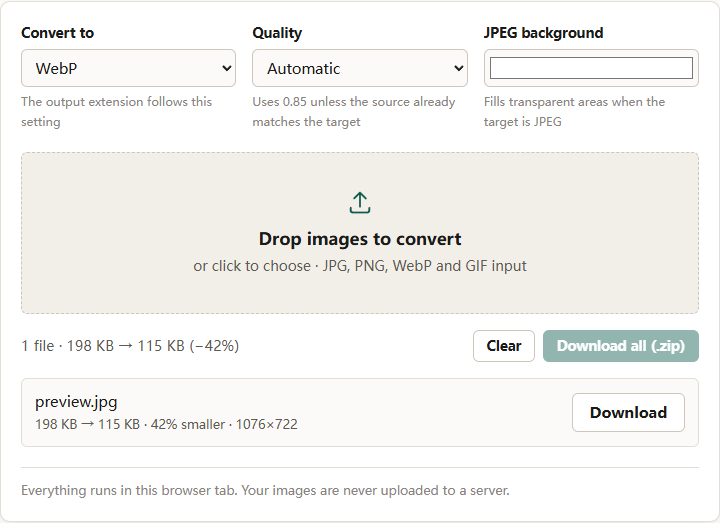
The format converter lets you choose the output format, which in practice chooses the compression family. PNG output is lossless. JPEG output is lossy. WebP can be either, but this converter produces lossy WebP when a quality value is set.
The image compressor works differently. When the output is PNG, it cannot lower quality because there is no quality to lower; it reduces pixel dimensions instead. When the output is JPEG or WebP, it searches quality to hit a byte target.
A 2400×3200 PNG document scan sent to the compressor with a 200 KB target came out at 434 KB and 1065×1420 — 63% smaller than the 1.2 MB source, but short of the target. The only lever available was dimension, and the tool reported that it could not reach the requested size.
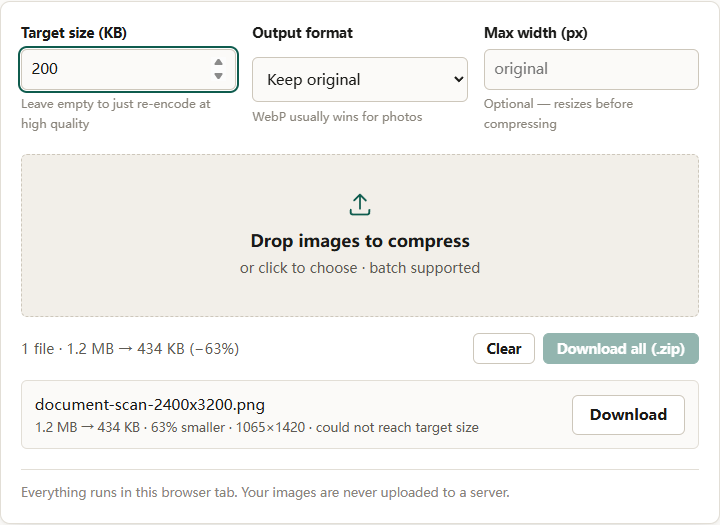
That behavior is a practical demonstration of the difference. Lossless compression has one lever: remove pixels or accept the size. Lossy compression has two: remove pixels or remove precision.
For a deeper comparison of the formats themselves, see PNG vs WebP vs JPEG. For the setting that controls lossy JPEG output, see JPEG quality settings explained.
The short version
Lossless means the original pixels come back exactly. Lossy means they do not, in exchange for a much smaller file. Photographs are hard to compress losslessly because they contain noise; graphics are easy because they contain repetition. Keep a lossless master, deliver lossy copies, and never re-encode a lossy file more times than necessary.