Formats
WebP Support in 2026 and When You Still Need a Fallback
WebP is decoded by 97.18% of browsers worldwide, according to caniuse. Full support has been in place since Chrome 32, Edge 18, Safari 16.0, and Firefox 65, which closes a question that used to require a polyfill. If rendering were the only test, the format would need no fallback at all.
That is not the only question. A file has to survive upload validators, content management systems, email clients, marketplace forms, and desktop software that is older than the browser tab it was downloaded from. Support at the rendering layer is not the same as permission at the destination.
What browsers actually support
All current versions of Chrome, Firefox, Safari, and Edge decode WebP. That covers lossy WebP, lossless WebP, alpha transparency, and animated WebP. The format also supports embedded color profiles and metadata, though tools differ in what they preserve when re-encoding.
Two practical details follow from this:
- A WebP image can be used as a normal image on a web page without a JavaScript polyfill.
- Transparency and animation are not reasons to avoid it. Both work in current browsers.
The remaining problems are outside the browser.
Where WebP still fails
Upload forms that validate by extension. Many forms accept a fixed list such as JPG, JPEG, and PNG. The file may be perfectly valid, but the validator rejects it before any decoder sees it. This is common on job portals, government forms, school systems, and marketplace listing tools.
Content management systems and older plugins. A CMS may accept the upload but fail to generate a thumbnail, or an image library may not recognize the MIME type. The result is a broken image rather than an error message.
Email clients. Support in email is inconsistent. Some desktop clients do not render WebP. Since email cannot rely on a browser engine, a JPEG fallback is still the safe choice for anything that must be seen.
Print and desktop publishing. Professional print workflows expect TIFF, PDF, or high-quality JPEG. WebP is not a print delivery format.
Marketplace and advertising platforms. These publish their own accepted-format lists, and WebP is often absent even when the platform’s website displays WebP images. The platform can decode a format without accepting it as an upload.
Older design and office software. Pasting a WebP into a document or slide deck may fail silently, or may insert a placeholder. If the file is going into a report, export a PNG or JPEG.
The fallback pattern that works
On a website you control, the standard approach is the picture element with a source type and an image fallback. The browser picks the first source it can decode and ignores the rest. A browser that does not understand WebP falls through to the JPEG.
In MDX and HTML, the structure looks roughly like this in code: a picture element containing a source with type="image/webp", followed by an img element pointing at a JPEG. The img is not optional. It is the fallback and the accessibility node.
Two rules keep this maintainable:
- Generate both files from the same master. Do not convert the WebP to JPEG. Encode each from the original so the fallback is not a second-generation copy.
- Keep the same dimensions and crop. If the two files differ in aspect ratio, the layout shifts when the fallback loads.
Server-side content negotiation is the other option. The server checks the browser’s Accept header and serves WebP when it is listed, JPEG otherwise. This keeps the markup simple and avoids duplicate elements, but it requires control over the server or CDN and correct cache headers. A misconfigured cache can serve WebP to a client that cannot read it.
The cost of a fallback
A fallback doubles storage for every image and adds a build step. For a small site, that is a minor cost. For a large library, it is real.
The decision should be based on the destination, not on an abstract support percentage. A personal blog viewed in current browsers can ship WebP only. A product catalog that also feeds a marketplace, an email newsletter, and a print catalog needs a JPEG or PNG master regardless, so producing both is nearly free.
| Destination | WebP safe? | Notes |
|---|---|---|
| Modern website you control | Yes | Add a fallback only if analytics show old clients |
| CMS with image processing | Usually, but test | Check thumbnail generation, not just upload |
| Email newsletter | No, use JPEG | Client support is inconsistent |
| Marketplace listing | Check the published list | Assume JPEG unless the list says otherwise |
| Print or publisher handoff | No | Use TIFF, PDF, or high-quality JPEG |
| Social platform upload | Often yes, but not guaranteed | Some schedulers reject it |
WebP is not automatically smaller
The format is efficient, but the saving depends on the image and the quality setting. For photographs, lossy WebP at a comparable visual quality is often smaller than JPEG. For small graphics, PNG can win because WebP carries more header overhead. For an image that is already a heavily compressed JPEG, converting to WebP may save little and will add a generation of loss.
Converting a 198 KB JPEG preview to WebP in the converter produced a 115 KB file at the same 1076×722 dimensions — 42% smaller. That is one file, not a guarantee; the next image may save less.
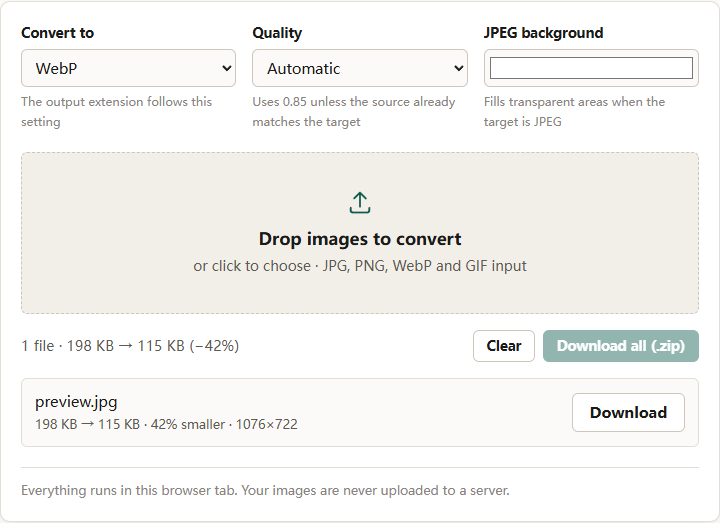
Compare one representative file before converting a batch. If the WebP is not meaningfully smaller, keep the format the destination prefers. A few percent is not worth a compatibility risk.
Transparency and the JPEG fallback
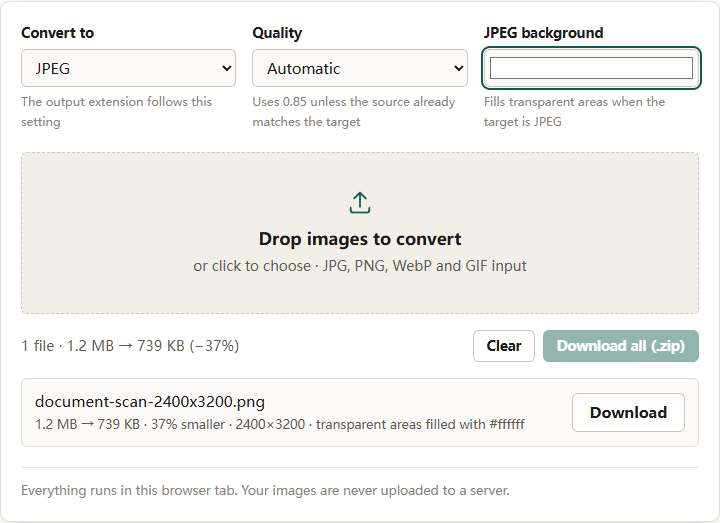
WebP supports alpha. JPEG does not. If a transparent WebP falls back to JPEG, the transparent areas must become a solid color. This is the same problem as converting any transparent PNG to JPEG, and it is easy to miss because the WebP version looks correct.
If the image needs transparency, the fallback should be PNG, not JPEG. If the fallback must be JPEG for size reasons, flatten the design onto a known background color first and make sure that color matches the page.
The format converter handles this explicitly: when the target is JPEG, it applies the chosen background color before drawing the image, so semi-transparent edges blend into that color rather than producing a halo.
A practical workflow
- Start from the highest-quality master. Do not use an existing web JPEG as the source.
- Export the WebP at a quality that looks clean at 100 percent. In the converter, Balanced (0.82) is a reasonable starting point; High (0.92) is better for detailed images.
- Export the fallback from the same master. Use JPEG for photographs and PNG for graphics with transparency or text.
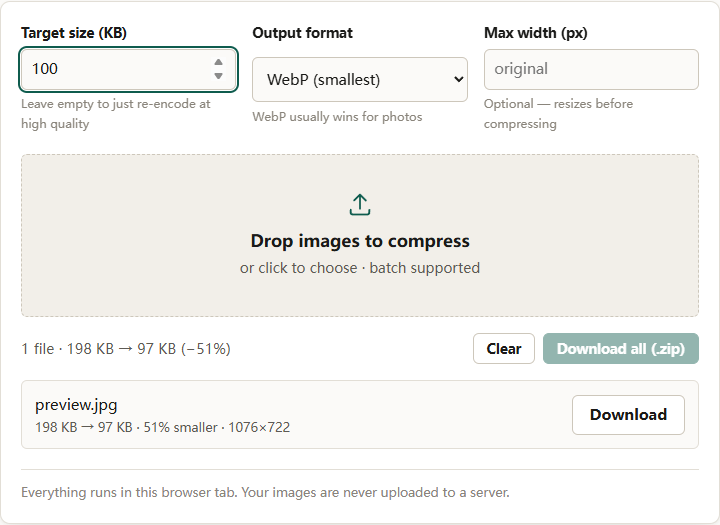
- If a byte limit applies, run both through the compressor with a target size. Compress after conversion, not before.
- Test the pair in the actual destination, not just in a browser tab.
For the broader question of which format to use, see PNG vs WebP vs JPEG. If the destination is a marketplace, check product image requirements before building a WebP-only batch.
The short version
Browser support for WebP is effectively complete. The remaining failures are at upload validators, email clients, print workflows, and platforms with their own accepted-format lists. Use WebP on sites you control, keep a JPEG or PNG fallback where the destination is uncertain, and generate both from the same master so the fallback is not a degraded copy.